Introduction
We’ve spent three weeks deep in EPAC territory—learning the tool, building pipelines, and mastering advanced patterns. Now it’s time to zoom out.
A governance framework isn’t just policies. It’s the entire system: the hierarchy that organizes your Azure estate, the policies that enforce standards, the monitoring that tracks compliance, and the automation that fixes drift.
This week, we’re building that system with designs you can actually implement. Management group design drives everything else, and the approach is always the same: start with audit, automate remediation, then enforce.
Governance framework architecture
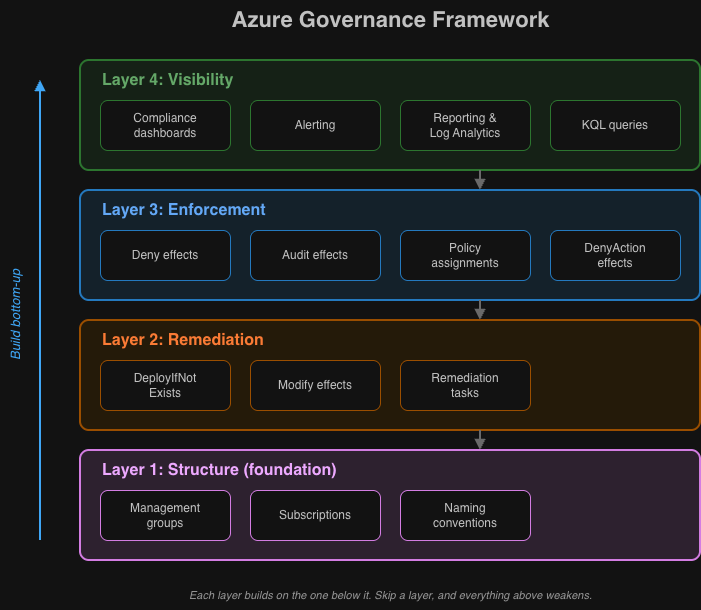
I think about governance in four layers:
┌──────────────────────────────────────────────────────────────────┐│ Layer 4: Visibility ││ Compliance dashboards, reporting, alerting │└──────────────────────────────────────────────────────────────────┘ │┌──────────────────────────────────────────────────────────────────┐│ Layer 3: Enforcement ││ Policy assignments, deny effects, audit effects │└──────────────────────────────────────────────────────────────────┘ │┌──────────────────────────────────────────────────────────────────┐│ Layer 2: Remediation ││ DeployIfNotExists, Modify effects, remediation tasks │└──────────────────────────────────────────────────────────────────┘ │┌──────────────────────────────────────────────────────────────────┐│ Layer 1: Structure ││ Management groups, subscriptions, naming conventions │└──────────────────────────────────────────────────────────────────┘Here’s how to build each one.
Layer 1: Management group structure
Your management group hierarchy is the foundation. Get it wrong, and everything above it becomes harder.
Cloud Adoption Framework recommended structure
Tenant Root Group│├── Intermediate Root (your-org-name)│ ││ ├── Platform│ │ ├── Management # Log Analytics, Automation│ │ ├── Connectivity # Hub VNets, Firewalls, DNS│ │ └── Identity # Domain Controllers, ADDS│ ││ ├── Landing Zones│ │ ├── Hybrid # Internal applications│ │ │ ├── Hybrid-Prod│ │ │ └── Hybrid-NonProd│ │ └── Public # Internet-facing applications│ │ ├── Public-Prod│ │ └── Public-NonProd│ ││ ├── Sandbox # Experimentation, no connectivity│ ││ └── Decommissioned # Subscriptions pending deletionWhy this structure works
| Level | Purpose | Policy Focus |
|---|---|---|
| Intermediate Root | Organization-wide standards | Security baselines, allowed regions |
| Platform | Shared services | Stricter controls, limited access |
| Landing Zones | Workload hosting | Workload-specific policies |
| Corp/Online | Connectivity type | Network policies, public exposure |
| Prod/NonProd | Environment | Deployment gates, cost controls |
| Sandbox | Experimentation | Minimal policies, cost limits only |
Implementation with Terraform
# Management Group Hierarchyresource "azurerm_management_group" "intermediate_root" {  display_name               = "Contoso"  parent_management_group_id = data.azurerm_management_group.tenant_root.id}
resource "azurerm_management_group" "platform" {  display_name               = "Platform"  parent_management_group_id = azurerm_management_group.intermediate_root.id}
resource "azurerm_management_group" "landing_zones" {  display_name               = "Landing Zones"  parent_management_group_id = azurerm_management_group.intermediate_root.id}
resource "azurerm_management_group" "corp" {  display_name               = "Corp"  parent_management_group_id = azurerm_management_group.landing_zones.id}
resource "azurerm_management_group" "online" {  display_name               = "Online"  parent_management_group_id = azurerm_management_group.landing_zones.id}
resource "azurerm_management_group" "sandbox" {  display_name               = "Sandbox"  parent_management_group_id = azurerm_management_group.intermediate_root.id}
resource "azurerm_management_group" "decommissioned" {  display_name               = "Decommissioned"  parent_management_group_id = azurerm_management_group.intermediate_root.id}
Layer 2: Policy assignment strategy
Policies should flow down the hierarchy, with more specific controls at lower levels.
Assignment hierarchy
Intermediate Root (Contoso):  # Universal security standards  - Allowed Locations (Deny)  - Require Resource Tags (Deny)  - Audit Unencrypted Storage (Audit)  - Deploy Defender for Cloud (DeployIfNotExists)
Platform:  # Strict platform controls  - Inherit all from parent  - Deny Public IP Addresses (Deny)  - Require Private Endpoints (Deny)  - Deploy Diagnostic Settings (DeployIfNotExists)
Landing Zones:  # Workload standards  - Inherit all from parent  - Audit Resources Without Tags (Audit)  - Deploy Activity Log Settings (DeployIfNotExists)
  Corp:    # Internal workload controls    - Inherit all from parent    - Deny Internet Outbound without Firewall (Deny)
  Online:    # Internet-facing controls    - Inherit all from parent    - Require WAF on Application Gateway (Deny)    - Audit Missing DDoS Protection (Audit)
Sandbox:  # Minimal controls  - Budget Alerts Only (DeployIfNotExists)  - Audit Expensive SKUs (Audit)  # Explicitly EXCLUDE security deny policies
Policy effect selection guide
| Scenario | Effect | When to Use |
|---|---|---|
| Block non-compliant deployments | Deny | Well-established standards, critical security |
| Track compliance without blocking | Audit | New policies, understanding current state |
| Auto-configure resources | DeployIfNotExists | Monitoring, logging, security agents |
| Modify existing properties | Modify | Tags, network settings, encryption |
| Block modifications | DenyAction | Prevent deletion of critical resources |
Example: tiered enforcement
Start with Audit, move to Deny:
{ "assignment": { "name": "require-storage-https", "displayName": "Require HTTPS for Storage Accounts" }, "parameters": { "effect": "Audit" // Phase 1: Audit }, "metadata": { "enforcementPhase": "1-audit", "denyDate": "2026-03-01", "notes": "Move to Deny after 60 days of compliance monitoring" }}After compliance reaches target:
{ "parameters": { "effect": "Deny" // Phase 2: Enforce }, "metadata": { "enforcementPhase": "2-deny", "auditCompletedDate": "2026-02-28", "complianceAtEnforcement": "98.5%" }}Layer 3: Remediation architecture
Policies with DeployIfNotExists and Modify effects can automatically fix non-compliant resources.
DeployIfNotExists pattern
Use for deploying additional resources (e.g., diagnostic settings):
{ "policyRule": { "if": { "field": "type", "equals": "Microsoft.Storage/storageAccounts" }, "then": { "effect": "DeployIfNotExists", "details": { "type": "Microsoft.Insights/diagnosticSettings", "name": "storage-diagnostics", "existenceCondition": { "allOf": [ { "field": "Microsoft.Insights/diagnosticSettings/logs.enabled", "equals": "true" } ] }, "roleDefinitionIds": [ "/providers/Microsoft.Authorization/roleDefinitions/749f88d5-cbae-40b8-bcfc-e573ddc772fa", "/providers/Microsoft.Authorization/roleDefinitions/92aaf0da-9dab-42b6-94a3-d43ce8d16293" ], "deployment": { "properties": { "mode": "incremental", "template": { "$schema": "https://schema.management.azure.com/schemas/2019-04-01/deploymentTemplate.json#", "contentVersion": "1.0.0.0", "parameters": { "storageAccountName": { "type": "string" }, "logAnalyticsWorkspaceId": { "type": "string" } }, "resources": [ { "type": "Microsoft.Storage/storageAccounts/providers/diagnosticSettings", "apiVersion": "2021-05-01-preview", "name": "[concat(parameters('storageAccountName'), '/Microsoft.Insights/storage-diagnostics')]", "properties": { "workspaceId": "[parameters('logAnalyticsWorkspaceId')]", "logs": [ { "category": "StorageRead", "enabled": true }, { "category": "StorageWrite", "enabled": true } ], "metrics": [ { "category": "Transaction", "enabled": true } ] } } ] }, "parameters": { "storageAccountName": { "value": "[field('name')]" }, "logAnalyticsWorkspaceId": { "value": "[parameters('logAnalyticsWorkspaceId')]" } } } } } } }}Modify pattern
Use for changing properties on existing resources (e.g., tags):
{ "policyRule": { "if": { "allOf": [ { "field": "type", "equals": "Microsoft.Resources/subscriptions/resourceGroups" }, { "field": "tags['Environment']", "exists": "false" } ] }, "then": { "effect": "Modify", "details": { "roleDefinitionIds": [ "/providers/Microsoft.Authorization/roleDefinitions/b24988ac-6180-42a0-ab88-20f7382dd24c" ], "operations": [ { "operation": "addOrReplace", "field": "tags['Environment']", "value": "[if(contains(field('name'), 'prod'), 'Production', 'Development')]" } ] } } }}Remediation task automation
Automate remediation with a scheduled pipeline:
# Get all non-compliant policy states for DeployIfNotExists policies$nonCompliantStates = Get-AzPolicyState `    -ManagementGroupName "contoso" `    -Filter "ComplianceState eq 'NonCompliant' and PolicyDefinitionAction eq 'deployifnotexists'" `    -Top 1000
# Group by policy assignment$groupedByAssignment = $nonCompliantStates | Group-Object PolicyAssignmentId
foreach ($group in $groupedByAssignment) {    $assignmentId = $group.Name    $resourceCount = $group.Count
    Write-Host "Creating remediation for $assignmentId ($resourceCount resources)"
    # Create remediation task    Start-AzPolicyRemediation `        -Name "auto-remediation-$(Get-Date -Format 'yyyyMMdd-HHmmss')" `        -ManagementGroupName "contoso" `        -PolicyAssignmentId $assignmentId `        -ResourceDiscoveryMode ReEvaluateCompliance
    # Add delay between remediations to avoid throttling    Start-Sleep -Seconds 30}
Layer 4: Compliance visibility
Without visibility, you’re just hoping your policies work. This layer is how you actually know.
Azure Policy compliance dashboard
Built-in compliance view shows:
- Overall compliance percentage
- Non-compliant resources by policy
- Trend over time
Access at: Azure Portal → Policy → Compliance
Custom compliance reporting
Export compliance data for custom dashboards:
# Export compliance summary$summary = Get-AzPolicyStateSummary -ManagementGroupName "contoso"
$report = @{    Timestamp = Get-Date -Format "yyyy-MM-dd HH:mm:ss"    TotalResources = $summary.Results.ResourceDetails.Count    CompliantResources = ($summary.Results.ResourceDetails |        Where-Object { $_.ComplianceState -eq 'Compliant' }).Count    NonCompliantResources = ($summary.Results.ResourceDetails |        Where-Object { $_.ComplianceState -eq 'NonCompliant' }).Count    CompliancePercentage = [math]::Round(        ($summary.Results.ResourceDetails |            Where-Object { $_.ComplianceState -eq 'Compliant' }).Count /        $summary.Results.ResourceDetails.Count * 100, 2    )}
$report | ConvertTo-Json | Out-File "compliance-report-$(Get-Date -Format 'yyyyMMdd').json"
Log Analytics integration
Stream policy events to Log Analytics:
# Diagnostic setting for Azure Policy eventsresource "azurerm_monitor_diagnostic_setting" "policy_events" {  name                       = "policy-to-log-analytics"  target_resource_id         = data.azurerm_subscription.current.id  log_analytics_workspace_id = azurerm_log_analytics_workspace.governance.id
  enabled_log {    category = "Policy"  }}
Query non-compliant resources:
AzureActivity| where CategoryValue == "Policy"| where OperationNameValue contains "audit" or OperationNameValue contains "deny"| summarize Count = count() by PolicyDefinitionName = tostring(Properties_d.policies[0].policyDefinitionName), Resource = tostring(Properties_d.resourceId)| order by Count descAlerting on compliance changes
resource "azurerm_monitor_scheduled_query_rules_alert_v2" "compliance_drop" {  name                = "compliance-drop-alert"  resource_group_name = azurerm_resource_group.governance.name  location            = azurerm_resource_group.governance.location
  evaluation_frequency = "PT1H"  window_duration      = "PT1H"  scopes               = [azurerm_log_analytics_workspace.governance.id]
  criteria {    query = <<-QUERY      AzureActivity      | where CategoryValue == "Policy"      | where OperationNameValue == "Microsoft.Authorization/policies/audit/action"      | summarize NonCompliantCount = count() by bin(TimeGenerated, 1h)      | where NonCompliantCount > 100    QUERY
    time_aggregation_method = "Count"    threshold               = 0    operator                = "GreaterThan"  }
  action {    action_groups = [azurerm_monitor_action_group.governance_alerts.id]  }}
Putting it all together: implementation roadmap
Phase 1: Foundation (Weeks 1-2)
Goals:
- Establish management group hierarchy
- Deploy baseline policies in Audit mode
- Configure compliance monitoring
Actions:
- Create management group structure
- Deploy EPAC with DEV environment only
- Assign core security policies (Audit effect)
- Set up Log Analytics for policy events
Phase 2: Enforcement (Weeks 3-4)
Goals:
- Move validated policies to Deny
- Implement remediation pipelines
- Add deployment gates
Actions:
- Review Phase 1 compliance data
- Update high-compliance policies to Deny
- Deploy remediation automation
- Create approval gates for policy changes
Phase 3: Optimization (Weeks 5-8)
Goals:
- Full environment coverage
- Custom policy development
- Advanced monitoring
Actions:
- Promote to Non-Prod and Production
- Develop organization-specific policies
- Build compliance dashboards
- Implement alerting
Phase 4: Maturity (Ongoing)
Goals:
- Continuous improvement
- Policy lifecycle management
- Compliance reporting
Actions:
- Quarterly policy reviews
- Exemption audits
- New Azure feature policy coverage
- Stakeholder reporting
Common governance patterns
Pattern: tag inheritance
Automatically inherit tags from resource groups:
{ "displayName": "Inherit CostCenter tag from resource group", "policyRule": { "if": { "allOf": [ { "field": "tags['CostCenter']", "exists": "false" }, { "value": "[resourceGroup().tags['CostCenter']]", "notEquals": "" } ] }, "then": { "effect": "Modify", "details": { "roleDefinitionIds": [ "/providers/Microsoft.Authorization/roleDefinitions/b24988ac-6180-42a0-ab88-20f7382dd24c" ], "operations": [ { "operation": "addOrReplace", "field": "tags['CostCenter']", "value": "[resourceGroup().tags['CostCenter']]" } ] } } }}Pattern: deny with exceptions
Allow specific users/groups to bypass:
{ "policyRule": { "if": { "allOf": [ { "field": "type", "equals": "Microsoft.Network/publicIPAddresses" }, { "value": "[if(empty(field('tags[''ApprovedBy'']')), 'false', 'true')]", "equals": "false" } ] }, "then": { "effect": "deny" } }}Pattern: environment-aware policies
Different enforcement by environment tag:
{ "policyRule": { "if": { "allOf": [ { "field": "tags['Environment']", "equals": "Production" }, { "field": "type", "equals": "Microsoft.Compute/virtualMachines" }, { "field": "Microsoft.Compute/virtualMachines/storageProfile.osDisk.managedDisk.storageAccountType", "notIn": ["Premium_LRS", "Premium_ZRS"] } ] }, "then": { "effect": "deny" } }}Key takeaways
-
A well-designed management group hierarchy makes everything else possible. Get that wrong and you’ll fight the structure forever.
-
Layer your controls: Structure, then Remediation, then Enforcement, then Visibility. Each layer builds on the previous one.
-
Start with Audit, graduate to Deny. Understand your current state before blocking deployments.
-
DeployIfNotExists and Modify effects scale where manual remediation never will.
-
You can’t improve what you can’t measure. Put monitoring in place early.
-
Plan for continuous evolution. Azure adds features constantly, and your organization’s needs will change too.
Sources
-
Microsoft, “Cloud Adoption Framework - Management Group Design,” https://learn.microsoft.com/azure/cloud-adoption-framework/ready/landing-zone/design-area/resource-org-management-groups
-
Microsoft, “Azure Policy Effects,” https://learn.microsoft.com/azure/governance/policy/concepts/effects
-
Microsoft, “Remediate Non-Compliant Resources with Azure Policy,” https://learn.microsoft.com/azure/governance/policy/how-to/remediate-resources
-
Microsoft, “Azure Policy Compliance Data,” https://learn.microsoft.com/azure/governance/policy/how-to/get-compliance-data
-
Microsoft, “Azure Landing Zone Policies,” https://learn.microsoft.com/azure/cloud-adoption-framework/ready/landing-zone/design-area/governance
-
Microsoft, “Azure Monitor Diagnostic Settings,” https://learn.microsoft.com/azure/azure-monitor/essentials/diagnostic-settings