Background
At work I build Azure landing zones. Every resource goes through a Terraform module with secure defaults, input validation and lifecycle management. Nothing is configured by hand.
Claude Code, on the other hand, started from zero every session. It didn’t know who I am, what I work on or how I want things done, so I re-explained my environment, naming conventions and Terraform patterns every morning.
That bothered me for a while. Then I found Daniel Miessler’s Personal AI Infrastructure (PAI).
What PAI is
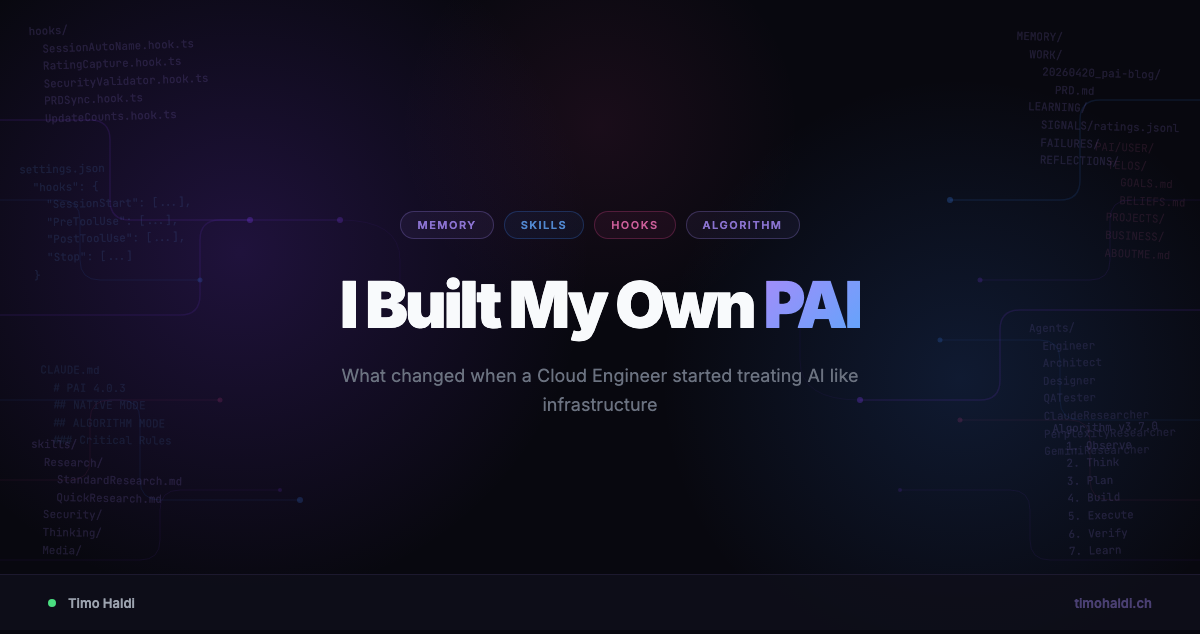
PAI adds layers on top of Claude Code: memory that persists between sessions, skills that package capabilities, hooks that run on lifecycle events, and an “Algorithm” for structuring larger tasks.
The comparison I use: plain Claude Code is like running az CLI commands by hand. It works, but there’s no structure. PAI is closer to putting Terraform on top, so the setup is repeatable and you can improve it over time.
Everything lives in ~/.claude/: Markdown files, TypeScript hooks, skill definitions and config. No cloud service, no extra subscription. Files on disk, in git.
Why I tried it
I was already using Claude Code daily for Terraform modules, research and Azure architecture work. Three things annoyed me.
First, repetition. Every session I explained where I work, which module framework we use and how our naming conventions work. The next day it was gone.
Second, inconsistent output. Sometimes I got the format I wanted, sometimes a wall of text, and there was no persistent way to say “always structure it like this”.
Third, there was no learning loop. Something went wrong, I corrected it, and the next week the same mistake came back.
PAI addresses all three. Memory covers context, hooks and skills cover consistency, and a learning system records failures so they don’t repeat.
My setup
I run PAI v4.0.3 on Claude Code. I structured it the way I’d structure a Terraform module: sensible defaults, explicit inputs, nothing configured twice.
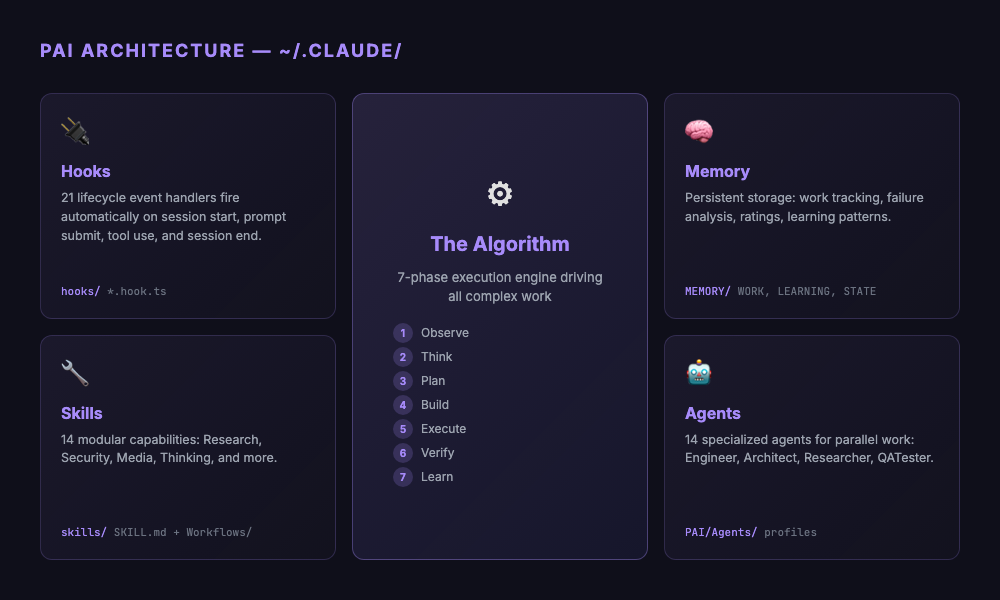
Skills (14): Research (parallel queries across Perplexity, Claude and Gemini), Security (recon, web assessment, prompt injection testing), Media (image generation, diagrams), Thinking (first principles, council debates, red teaming), plus domain-specific ones like Telos and USMetrics.
Hooks (21) that run automatically during the session lifecycle. The ones I notice most:
SessionAutoName.hook.ts: names each session from the first promptRatingCapture.hook.ts: captures satisfaction signals and writes a full context dump when a result is rated badlySecurityValidator.hook.ts: checks tool calls against security rules before they runPRDSync.hook.ts: keeps task tracking in sync when work documents change
The Algorithm is a 7-phase process (Observe, Think, Plan, Build, Execute, Verify, Learn) for larger tasks. It breaks work into small, testable criteria before anything is changed. Too much for quick questions, useful when a task has several parts.
Agents (14): Engineer, Architect, Designer, QATester and several researcher variants. They run in parallel, which helped more than I expected.
What changed
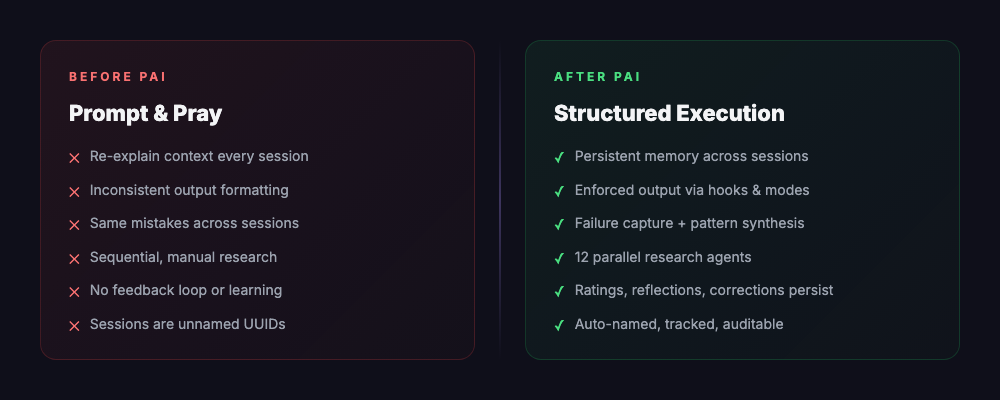
Before, I opened Claude Code, typed something and hoped for the best. If the output was wrong, I fixed it. The next day, the same corrections.
Now sessions have a lifecycle. They get names, work is tracked in PRDs with pass/fail criteria, failures are captured with full context, and corrections carry over to the next session.
An example: for a larger Terraform module, the Algorithm split the work into criteria (secure defaults configured, input validation present, conditional resources working, tests passing), each checkable on its own. When I rated the result low, the failure system stored the context so the next session could avoid the same mistakes.
The hooks had more effect on my daily work than I expected. Seeing “VNet Spoke Module Refactor” instead of “session 47a2f…” sounds minor, but it makes it much easier to find my way back. The security validator has caught a few tool calls I would have missed, and the rating system feeds corrections into the next session.
Research also changed. The Research skill starts several agents in parallel, each querying a different provider. What took me about 20 minutes now takes about a minute, and the results are usually more complete.
The parallel to cloud infrastructure
At some point I noticed the architecture maps to what I build at work.
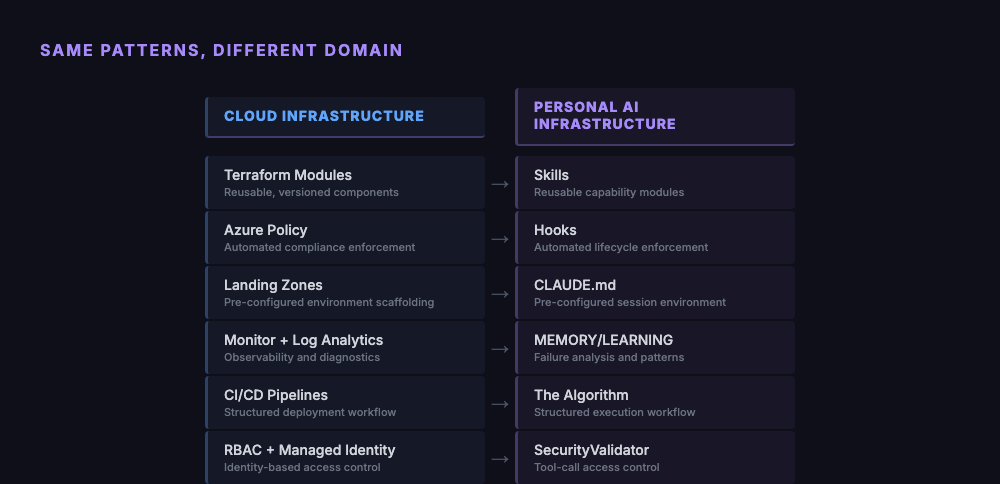
Skills correspond to Terraform modules, hooks to Azure Policy, the memory system to Monitor and Log Analytics, and the Algorithm to a CI/CD pipeline with gates. A Terraform module encodes how infrastructure should look. Configuring PAI encodes how the AI should work with me.
Downsides
PAI takes time to set up.
It’s fully terminal-based: git, TypeScript, shell scripting. Without those, the learning curve is steep. Miessler says PAI is for everyone, but at the moment it’s for developers.
The Algorithm is sometimes too much. A quick question doesn’t need seven phases, voice announcements, a PRD and criteria decomposition. Native mode handles simple requests, but it isn’t always clear where “simple” ends.
TELOS is the part where you write down your mission, beliefs and challenges in Markdown. I still haven’t filled mine out. I see the value, but it keeps getting pushed back by actual work.
The project also moves fast. PAI is at v4.0.3, and the memory system has gone through 7 major versions since January. If you follow upstream, you’ll spend time on migrations.
Who it’s for
If you use Claude Code every day, are tired of repeating yourself, and are comfortable with TypeScript and git, PAI is worth the setup effort. If you open ChatGPT once a week to summarise an email, or prefer a GUI, it probably isn’t.
Even without PAI itself, the ideas carry over: memory across sessions, hooks for automation, structured execution for larger tasks. You can build simpler versions of these in other AI tools.
What I’d do differently
I’d start with hooks: session naming, security validation, rating capture. They’re useful right away with little setup. Skills and the Algorithm take longer to learn and customise.
I’d fill out the TELOS files on day one. Skills and agents read them for context, and with empty files PAI can’t adapt to what matters to you.
And I’d pick a version and stay on it for a while instead of following every upstream commit. Update when you need something specific.
Closing
Miessler calls it infrastructure for a reason. Hooks, memory and the Algorithm are plumbing. What I get out of it is faster research, more consistent output and fewer repeated mistakes.
The same idea applied to a team became the governed AI platform on Microsoft Foundry, where data residency, identity and audit are hard requirements instead of personal preferences.