I treat infrastructure as code, so why wasn’t I doing that with my AI?
At work, I build Azure landing zones. Every resource gets a Terraform module with security-first defaults, input validation, lifecycle management. Nothing is ad-hoc, nothing manually configured.
And then I’d open Claude Code and start from scratch. Every time.
It had no idea who I am, what I work on, or how I like things done. I’d re-explain my environment, my naming conventions, my Terraform patterns every single morning. Meanwhile at work I’m building sophisticated IaC, and my AI assistant is a disposable notepad.
That bugged me for a while. Then I stumbled on Daniel Miessler’s Personal AI Infrastructure (PAI), and things clicked.
What PAI actually is
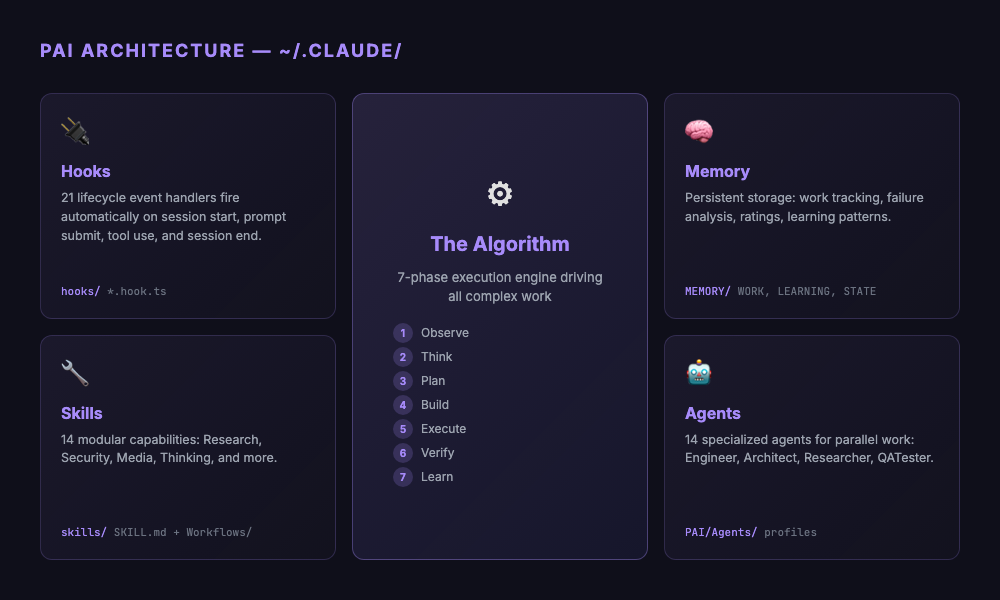
PAI turns Claude Code from a stateless chat into something that actually remembers. You add layers: memory that sticks between sessions, skills that package capabilities, hooks that fire on lifecycle events, and an algorithm for structuring complex work.
The analogy I keep using: Claude Code out of the box is like running raw az CLI commands. It works, but there’s no structure. PAI is the Terraform layer on top. Makes the interaction repeatable, and more importantly, improvable.
Everything lives in ~/.claude/. Markdown files, TypeScript hooks, skill definitions, config. No cloud services, no extra subscriptions. Just files on disk, in git, under your control.
Why I tried it
I was already in Claude Code every day for Terraform modules, infrastructure research, Azure architecture work. But three things kept annoying me.
First, the repetition. Every session I’d tell it I work at Netcloud, I use the NCF module framework, my naming conventions work a certain way. The next day? Gone. All of it.
Second, output quality was inconsistent. Sometimes Claude nailed the format I wanted. Other times, wall of text. And there was no way to say “remember, I always want it structured like this” in a way that actually persisted.
Third, and this one took me longer to put my finger on: there was no learning loop. Something goes wrong, I correct it, we move on. Next week, same mistake. Nothing carries forward. It’s like training a colleague who forgets everything overnight.
PAI tackles all of that. Memory handles context. Hooks and skills handle consistency. And a learning system captures failures so the same mistake doesn’t keep happening.
My actual setup
I’m running PAI v4.0.3 on Claude Code. Quick overview of what I have:
14 skills across Research (parallel multi-agent queries across Perplexity, Claude, Gemini), Security (recon, web assessment, prompt injection testing), Media (image generation, diagrams), Thinking (first principles, council debates, red teaming), plus domain-specific ones like Telos and USMetrics.
21 hooks that fire automatically during the session lifecycle. The ones I notice most:
SessionAutoName.hook.ts: names each session from the first promptRatingCapture.hook.ts: captures satisfaction signals, creates full context dumps when things go badlySecurityValidator.hook.ts: checks tool calls against security rules before they executePRDSync.hook.ts: keeps task tracking in sync when work documents change
The Algorithm is a 7-phase engine (Observe, Think, Plan, Build, Execute, Verify, Learn) for complex work. It forces decomposition into atomic, testable criteria before you touch anything. Overkill for quick questions, but worth it when the task has moving parts.
14 specialized agents: Engineer, Architect, Designer, QATester, various researcher flavors. They run in parallel, which matters more than I expected.
What actually changed
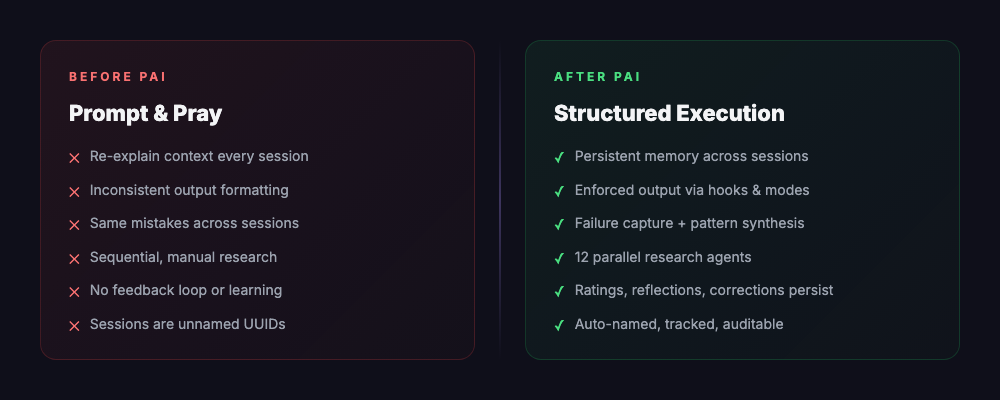
Before: prompt and pray
Open Claude Code, type something, hope it works. Output is wrong? Fix it, move on. Next day, same mistakes, same corrections.
After: sessions have structure
It’s not one feature that made the difference. It’s that working with AI now has lifecycle management. Sessions get names. Work gets tracked in PRDs with actual pass/fail criteria. When something breaks, the full context gets captured. Corrections stick around between sessions.
One example: I was working on a complex Terraform module. The Algorithm broke it down into criteria: security defaults configured, input validation present, conditional resources working, tests passing. Each one independently verifiable. When I rated the result low, the failure system stored the full context so the next session could avoid the same mistakes.
Hooks surprised me. I figured they’d be nice-to-have. Turns out they changed my daily workflow more than the big features. Session auto-naming alone, seeing “VNet Spoke Module Refactor” instead of “session 47a2f…”, sounds trivial but actually cuts cognitive load. The security validator has caught a few tool calls I would’ve missed. The rating system feeds corrections back into the next session.
Research changed too. Instead of manually searching and reading, the Research skill spins up multiple agents in parallel, each querying a different provider. What took 20 minutes now takes about a minute, and results tend to be more complete because they come from multiple angles.
The pattern that made it click
At some point I noticed the architecture maps directly to what I build at work.
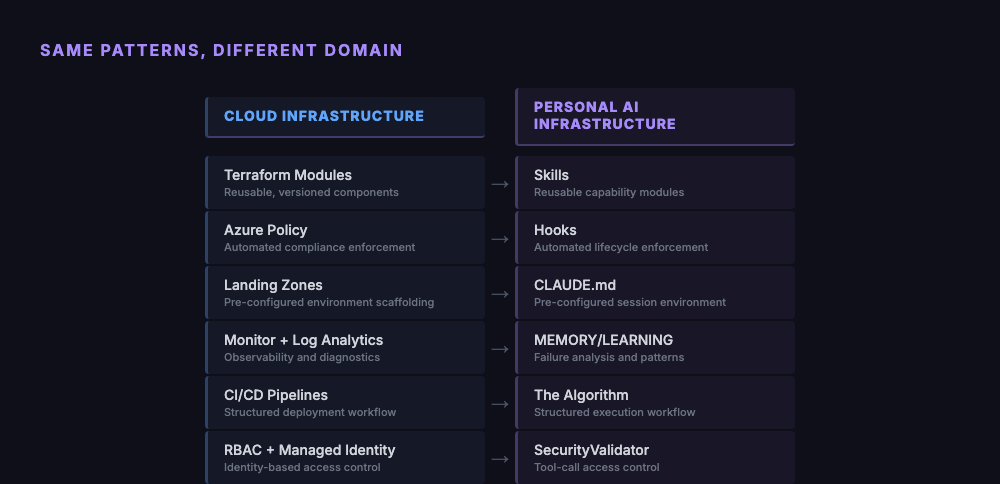
Skills are Terraform modules. Hooks are Azure Policy. The memory system is Monitor and Log Analytics. The Algorithm is your CI/CD pipeline with gates.
When I build a Terraform module, I encode my organization’s opinions about how infrastructure should look. Configuring PAI is the same thing, encoding how AI should work with me. Same discipline, different material.
What’s hard
PAI is not a weekend project.
It’s fully terminal-native. Git, TypeScript, shell scripting. If those aren’t already in your toolbox, the learning curve is rough. Miessler talks about PAI being for “everyone” but right now it’s for developers. Maybe that changes, but not yet.
The Algorithm is sometimes too much ceremony. A quick question doesn’t need seven phases, voice announcements, PRD creation, and criteria decomposition. Native mode handles the simple stuff, but the boundary between “simple” and “Algorithm-worthy” isn’t always obvious.
TELOS is the life goals system where you define your mission, beliefs, challenges in markdown. I still haven’t filled mine out. I can see the value, but sitting down to articulate my life goals in structured files keeps getting bumped by actual work.
And the system moves fast. PAI is at v4.0.3, the memory system has been through 7 major versions since January. If you’re tracking upstream, you’ll spend time on migrations. That’s the tradeoff of using something under active development.
Who should try this
If you’re in Claude Code every day, frustrated by repeating yourself, and you think in systems, PAI will feel natural. If you’re comfortable with TypeScript and git and want your AI interactions to improve over time rather than resetting every session, it’s worth the setup cost.
If you open ChatGPT once a week to summarize an email, probably skip this. Same if you prefer clicking buttons over typing commands.
Even if PAI itself isn’t your style though, the ideas are portable. Memory across sessions, hooks for automation, structured execution for complex tasks. You can build lightweight versions of those in any AI tool. The framework is open source, the concepts work anywhere.
What I’d do differently
If I started fresh, I’d go hooks first. Not skills, not the Algorithm, not TELOS. Session naming, security validation, rating capture. These deliver value immediately with minimal setup. Everything else takes time to learn and customize. Hooks just work.
I’d also fill out the TELOS files from day one instead of putting it off. Every skill and agent reads from them to understand context. Empty TELOS means PAI can’t adapt to what actually matters to you.
And I’d pick a version and stay on it for a while instead of chasing upstream. Get it working for your workflow first. Update when something specific pulls you forward, not just because there’s a new commit.
The bigger picture
Miessler calls this infrastructure for a reason. Nobody gets excited about Terraform state files or Azure Policy definitions. But infrastructure is what makes everything else work without you thinking about it.
Same with personal AI. The hooks, the memory, the Algorithm. That’s all plumbing. The interesting part is what happens on top: faster research, more consistent output, fewer repeated mistakes.
I build Azure landing zones so teams can deploy workloads without worrying about networking or compliance. PAI does that for AI. It handles the plumbing so you can focus on the actual work.