The EPAC series covered the tool, the pipelines and exemptions and advanced patterns. This post looks at the governance setup around it: the management group hierarchy, the policy assignments, remediation, and compliance monitoring.
My approach is the same in every environment: get the management group design right, start policies in audit mode, automate remediation, and only then enforce.
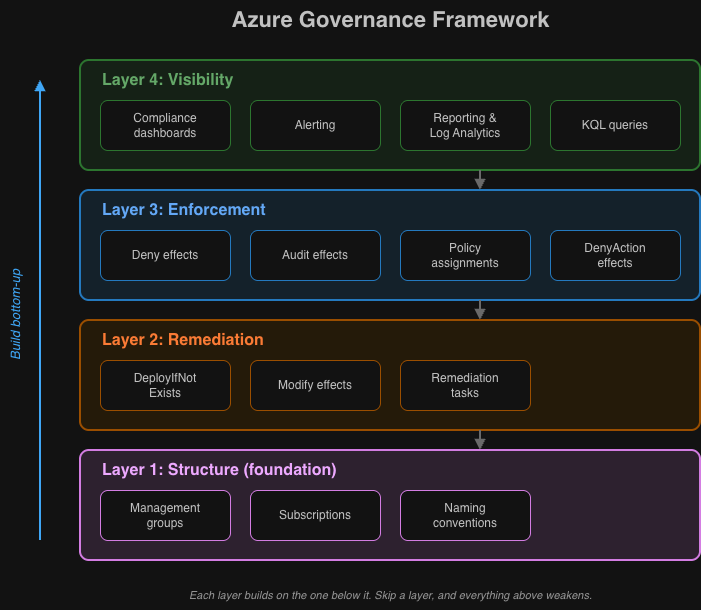
Four layers
I split governance into four layers:
┌──────────────────────────────────────────────────────────────────┐│ Layer 4: Visibility ││ Compliance dashboards, reporting, alerting │└──────────────────────────────────────────────────────────────────┘ │┌──────────────────────────────────────────────────────────────────┐│ Layer 3: Enforcement ││ Policy assignments, deny effects, audit effects │└──────────────────────────────────────────────────────────────────┘ │┌──────────────────────────────────────────────────────────────────┐│ Layer 2: Remediation ││ DeployIfNotExists, Modify effects, remediation tasks │└──────────────────────────────────────────────────────────────────┘ │┌──────────────────────────────────────────────────────────────────┐│ Layer 1: Structure ││ Management groups, subscriptions, naming conventions │└──────────────────────────────────────────────────────────────────┘Layer 1: management group structure
Everything else depends on the management group hierarchy, which builds on the cloud foundation post. A badly designed hierarchy makes every layer above it harder.
Cloud Adoption Framework recommended structure
Tenant Root Group│├── Intermediate Root (your-org-name)│ ││ ├── Platform│ │ ├── Management # Log Analytics, Automation│ │ ├── Connectivity # Hub VNets, Firewalls, DNS│ │ └── Identity # Domain Controllers, ADDS│ ││ ├── Landing Zones│ │ ├── Corp # Internal applications│ │ │ ├── Corp-Prod│ │ │ └── Corp-NonProd│ │ └── Online # Internet-facing applications│ │ ├── Online-Prod│ │ └── Online-NonProd│ ││ ├── Sandbox # Experimentation, no connectivity│ ││ └── Decommissioned # Subscriptions pending deletionWhat each level is for
| Level | Purpose | Policy Focus |
|---|---|---|
| Intermediate Root | Organization-wide standards | Security baselines, allowed regions |
| Platform | Shared services | Stricter controls, limited access |
| Landing Zones | Workload hosting | Workload-specific policies |
| Corp/Online | Connectivity type | Network policies, public exposure |
| Prod/NonProd | Environment | Deployment gates, cost controls |
| Sandbox | Experimentation | Minimal policies, cost limits only |
For access control on each level, combine this with Privileged Identity Management for just-in-time access. For the cost controls on Sandbox and Prod/NonProd, see Azure cost management with budget alerts.
Implementation with Terraform
# Management Group Hierarchyresource "azurerm_management_group" "intermediate_root" {  display_name               = "Contoso"  parent_management_group_id = data.azurerm_management_group.tenant_root.id}
resource "azurerm_management_group" "platform" {  display_name               = "Platform"  parent_management_group_id = azurerm_management_group.intermediate_root.id}
resource "azurerm_management_group" "landing_zones" {  display_name               = "Landing Zones"  parent_management_group_id = azurerm_management_group.intermediate_root.id}
resource "azurerm_management_group" "corp" {  display_name               = "Corp"  parent_management_group_id = azurerm_management_group.landing_zones.id}
resource "azurerm_management_group" "online" {  display_name               = "Online"  parent_management_group_id = azurerm_management_group.landing_zones.id}
resource "azurerm_management_group" "sandbox" {  display_name               = "Sandbox"  parent_management_group_id = azurerm_management_group.intermediate_root.id}
resource "azurerm_management_group" "decommissioned" {  display_name               = "Decommissioned"  parent_management_group_id = azurerm_management_group.intermediate_root.id}
Layer 3: policy assignment strategy
Broad policies sit high in the hierarchy, more specific ones lower down.
Assignment hierarchy
Intermediate Root (Contoso):  # Universal security standards  - Allowed Locations (Deny)  - Require Resource Tags (Deny)  - Audit Unencrypted Storage (Audit)  - Deploy Defender for Cloud (DeployIfNotExists)
Platform:  # Strict platform controls  - Inherit all from parent  - Deny Public IP Addresses (Deny)  - Require Private Endpoints (Deny)  - Deploy Diagnostic Settings (DeployIfNotExists)
Landing Zones:  # Workload standards  - Inherit all from parent  - Audit Resources Without Tags (Audit)  - Deploy Activity Log Settings (DeployIfNotExists)
  Corp:    # Internal workload controls    - Inherit all from parent    - Deny Internet Outbound without Firewall (Deny)
  Online:    # Internet-facing controls    - Inherit all from parent    - Require WAF on Application Gateway (Deny)    - Audit Missing DDoS Protection (Audit)
Sandbox:  # Minimal controls  - Budget Alerts Only (DeployIfNotExists)  - Audit Expensive SKUs (Audit)  # Explicitly EXCLUDE security deny policies
Choosing the effect
| Scenario | Effect | When to Use |
|---|---|---|
| Block non-compliant deployments | Deny | Well-established standards, critical security |
| Track compliance without blocking | Audit | New policies, understanding current state |
| Auto-configure resources | DeployIfNotExists | Monitoring, logging, security agents |
| Modify existing properties | Modify | Tags, network settings, encryption |
| Block modifications | DenyAction | Prevent deletion of critical resources |
Example: tiered enforcement
Phase 1 uses Audit to see the current state before blocking anything:
{ "assignment": { "name": "require-storage-https", "displayName": "Require HTTPS for Storage Accounts" }, "parameters": { "effect": "Audit" }, "metadata": { "enforcementPhase": "1-audit", "denyDate": "2026-03-01", "notes": "Move to Deny after 60 days of compliance monitoring" }}Once compliance reaches your target, phase 2 switches to Deny:
{ "parameters": { "effect": "Deny" }, "metadata": { "enforcementPhase": "2-deny", "auditCompletedDate": "2026-02-28", "complianceAtEnforcement": "98.5%" }}Layer 2: remediation architecture
Policies with DeployIfNotExists and Modify effects can fix non-compliant resources automatically.
DeployIfNotExists pattern
For deploying additional resources, such as diagnostic settings:
{ "policyRule": { "if": { "field": "type", "equals": "Microsoft.Storage/storageAccounts" }, "then": { "effect": "DeployIfNotExists", "details": { "type": "Microsoft.Insights/diagnosticSettings", "name": "storage-diagnostics", "existenceCondition": { "allOf": [ { "field": "Microsoft.Insights/diagnosticSettings/logs.enabled", "equals": "true" } ] }, "roleDefinitionIds": [ "/providers/Microsoft.Authorization/roleDefinitions/749f88d5-cbae-40b8-bcfc-e573ddc772fa", // Monitoring Contributor "/providers/Microsoft.Authorization/roleDefinitions/92aaf0da-9dab-42b6-94a3-d43ce8d16293" // Log Analytics Contributor ], "deployment": { "properties": { "mode": "incremental", "template": { "$schema": "https://schema.management.azure.com/schemas/2019-04-01/deploymentTemplate.json#", "contentVersion": "1.0.0.0", "parameters": { "storageAccountName": { "type": "string" }, "logAnalyticsWorkspaceId": { "type": "string" } }, "resources": [ { "type": "Microsoft.Storage/storageAccounts/providers/diagnosticSettings", "apiVersion": "2021-05-01-preview", "name": "[concat(parameters('storageAccountName'), '/Microsoft.Insights/storage-diagnostics')]", "properties": { "workspaceId": "[parameters('logAnalyticsWorkspaceId')]", "logs": [ { "category": "StorageRead", "enabled": true }, { "category": "StorageWrite", "enabled": true } ], "metrics": [ { "category": "Transaction", "enabled": true } ] } } ] }, "parameters": { "storageAccountName": { "value": "[field('name')]" }, "logAnalyticsWorkspaceId": { "value": "[parameters('logAnalyticsWorkspaceId')]" } } } } } } }}Modify pattern
For changing properties on existing resources, such as tags:
{ "policyRule": { "if": { "allOf": [ { "field": "type", "equals": "Microsoft.Resources/subscriptions/resourceGroups" }, { "field": "tags['Environment']", "exists": "false" } ] }, "then": { "effect": "Modify", "details": { "roleDefinitionIds": [ "/providers/Microsoft.Authorization/roleDefinitions/b24988ac-6180-42a0-ab88-20f7382dd24c" ], "operations": [ { "operation": "addOrReplace", "field": "tags['Environment']", "value": "[if(contains(field('name'), 'prod'), 'Production', 'Development')]" } ] } } }}Remediation task automation
This script runs in a scheduled pipeline:
# Get all non-compliant policy states for DeployIfNotExists policies$nonCompliantStates = Get-AzPolicyState `    -ManagementGroupName "contoso" `    -Filter "ComplianceState eq 'NonCompliant' and PolicyDefinitionAction eq 'deployifnotexists'" `    -Top 1000
# Group by policy assignment$groupedByAssignment = $nonCompliantStates | Group-Object PolicyAssignmentId
foreach ($group in $groupedByAssignment) {    $assignmentId = $group.Name    $resourceCount = $group.Count
    Write-Host "Creating remediation for $assignmentId ($resourceCount resources)"
    # Create remediation task    Start-AzPolicyRemediation `        -Name "auto-remediation-$(Get-Date -Format 'yyyyMMdd-HHmmss')" `        -ManagementGroupName "contoso" `        -PolicyAssignmentId $assignmentId `        -ResourceDiscoveryMode ReEvaluateCompliance
    # Add delay between remediations to avoid throttling    Start-Sleep -Seconds 30}
Layer 4: compliance visibility
This layer tells you whether the policies actually do what you expect.
Built-in compliance view
Azure Portal > Policy > Compliance shows the overall compliance percentage, non-compliant resources per policy, and the trend over time.
Custom compliance reporting
To feed your own dashboards, export the compliance data:
# Export compliance summary# Get-AzPolicyStateSummary returns aggregate counts, not individual resource states$summary = Get-AzPolicyStateSummary -ManagementGroupName "contoso"
$report = @{    Timestamp             = Get-Date -Format "yyyy-MM-dd HH:mm:ss"    NonCompliantResources = $summary.Results.NonCompliantResources    NonCompliantPolicies  = $summary.Results.NonCompliantPolicies}
# For per-resource compliance details, use Get-AzPolicyState instead$allStates = Get-AzPolicyState -ManagementGroupName "contoso" -Top 5000
$compliant    = ($allStates | Where-Object { $_.ComplianceState -eq 'Compliant' }).Count$nonCompliant = ($allStates | Where-Object { $_.ComplianceState -eq 'NonCompliant' }).Count$total        = $compliant + $nonCompliant
$report["TotalResources"]      = $total$report["CompliantResources"]   = $compliant$report["CompliancePercentage"] = if ($total -gt 0) {    [math]::Round($compliant / $total * 100, 2)} else { 0 }
$report | ConvertTo-Json | Out-File "compliance-report-$(Get-Date -Format 'yyyyMMdd').json"
Log Analytics integration
To stream policy events to Log Analytics, I use azapi_resource, because the standard azurerm_monitor_diagnostic_setting resource does not support subscription-scoped diagnostics:
resource "azapi_resource" "subscription_diagnostic_setting" {  type      = "Microsoft.Insights/diagnosticSettings@2021-05-01-preview"  name      = "policy-to-log-analytics"  parent_id = data.azurerm_subscription.current.id
  body = jsonencode({    properties = {      workspaceId = azurerm_log_analytics_workspace.governance.id      logs = [        {          category = "Policy"          enabled  = true        },        {          category = "Administrative"          enabled  = true        }      ]    }  })}
Query non-compliant resources:
AzureActivity| where CategoryValue == "Policy"| where OperationNameValue == "Microsoft.Authorization/policies/audit/action" or OperationNameValue == "Microsoft.Authorization/policies/deny/action"| extend PolicyProps = parse_json(Properties)| summarize Count = count() by PolicyDefinitionName = tostring(PolicyProps.policies[0].policyDefinitionName), Resource = tostring(PolicyProps.resource)| order by Count descAlerting on compliance changes
resource "azurerm_monitor_scheduled_query_rules_alert_v2" "compliance_drop" {  name                = "compliance-drop-alert"  resource_group_name = azurerm_resource_group.governance.name  location            = azurerm_resource_group.governance.location
  evaluation_frequency = "PT1H"  window_duration      = "PT1H"  scopes               = [azurerm_log_analytics_workspace.governance.id]
  criteria {    query = <<-QUERY      AzureActivity      | where CategoryValue == "Policy"      | where OperationNameValue == "Microsoft.Authorization/policies/audit/action"      | summarize NonCompliantCount = count() by bin(TimeGenerated, 1h)      | where NonCompliantCount > 100  // Adjust this threshold to your environment baseline    QUERY
    time_aggregation_method = "Count"    threshold               = 0    operator                = "GreaterThan"  }
  action {    action_groups = [azurerm_monitor_action_group.governance_alerts.id]  }}
Rollout plan
| Phase | Timeframe | Steps |
|---|---|---|
| 1. Foundation | Weeks 1-2 | Create the management group structure, deploy EPAC with the DEV environment only, assign core security policies with Audit effect, send policy events to Log Analytics |
| 2. Enforcement | Weeks 3-4 | Review the phase 1 compliance data, switch high-compliance policies to Deny, deploy remediation automation, add approval gates for policy changes |
| 3. Expansion | Weeks 5-8 | Promote to Non-Prod and Production, write organisation-specific policies, build compliance dashboards and alerting |
| 4. Operation | Ongoing | Quarterly policy reviews, exemption audits, policy coverage for new Azure features, reporting to stakeholders |
Common patterns
Tag inheritance
Copy a tag from the resource group to resources that don’t have it:
{ "displayName": "Inherit CostCenter tag from resource group", "policyRule": { "if": { "allOf": [ { "field": "tags['CostCenter']", "exists": "false" }, { "value": "[resourceGroup().tags['CostCenter']]", "notEquals": "" } ] }, "then": { "effect": "Modify", "details": { "roleDefinitionIds": [ "/providers/Microsoft.Authorization/roleDefinitions/b24988ac-6180-42a0-ab88-20f7382dd24c" ], "operations": [ { "operation": "addOrReplace", "field": "tags['CostCenter']", "value": "[resourceGroup().tags['CostCenter']]" } ] } } }}Deny with policy exemptions
For exceptions to a deny policy, use policy exemptions instead of a bypass tag. With a tag-based bypass, anyone with Tag Contributor permissions can add the tag and get around the policy. Exemptions managed in EPAC have an expiry date and approval metadata:
{ "exemptions": { "public-ip-legacy-app": { "displayName": "Legacy app public IP - approved exception", "policyAssignmentId": "/providers/Microsoft.Management/managementGroups/contoso/providers/Microsoft.Authorization/policyAssignments/deny-public-ip", "exemptionCategory": "Waiver", "expiresOn": "2026-06-01T00:00:00Z", "metadata": { "approvedBy": "security-review-board", "ticketReference": "SEC-2026-0042", "reviewDate": "2026-05-01" } } }}The exception is tracked in source control, creating it requires RBAC permissions, and it expires on its own.
Environment-aware policies
Stricter rules based on the environment tag, here premium disks for production VMs:
{ "policyRule": { "if": { "allOf": [ { "field": "tags['Environment']", "equals": "Production" }, { "field": "type", "equals": "Microsoft.Compute/virtualMachines" }, { "field": "Microsoft.Compute/virtualMachines/storageProfile.osDisk.managedDisk.storageAccountType", "notIn": ["Premium_LRS", "Premium_ZRS"] } ] }, "then": { "effect": "deny" } }}Sources
-
Microsoft, “Cloud Adoption Framework - Management Group Design,” Microsoft Learn
-
Microsoft, “Azure Policy Effects,” Microsoft Learn
-
Microsoft, “Remediate Non-Compliant Resources with Azure Policy,” Microsoft Learn
-
Microsoft, “Azure Policy Compliance Data,” Microsoft Learn
-
Microsoft, “Azure Landing Zone Policies,” Microsoft Learn
-
Microsoft, “Azure Monitor Diagnostic Settings,” Microsoft Learn